


Jailbreak tweak: how to forward your text messages to your email
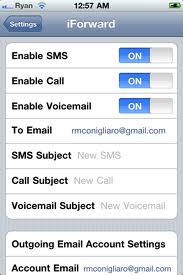
If this is what you need by some chance, here is to solve the problem.
iForward is a great Cydia jailbreak tweak which will redirect your SMS messages to your email. There are different reasons you would want to do something like this. Perhaps it is your privacy you want to protect? If so, iForward could be an ideal solution for your needs. You can fetch this jailbreak tweak from Cydia app store. Of course, before you can get it and use it, you need to jailbreak your device with RedSn0w, Sn0wbreeze or some other jailbreak tool for iOS devices. This app was developed and launched by Ryan Conigliaro, who made it compatible with both iOS 4.x and iOS 5. Any configuration setting you need to adjust, can be done inside the standard iOS settings app. Afterwards, all new SMS will be efficiently delivered to your email inbox. Nice, isn’t it?
When you setup up the redirect, you will also receive a notification on sent text messages from your device. You can currently use only one email address. iForward will notify you also about calls and your voice mail.
Another nice feature of iForward is that it supports privacy technologies like SSL encryption, meaning your data is relatively safe. Please note: if you use your iPhone frequently, you could easily end up with a lot of clutter in your email inbox! If you think this is an app for you, you can get it in Cydia app store for only $1.99. If you need to control your iPhone SMS usage, iForward is definitely a great tool to have in your toolbox!
Related Posts:
Leave a comment

Follow Us!



Recent Posts
Categories
Tags
Archives
Related Sources
- iPhone Dev Team