

Cydia tweaks: Customize Siri background

As always jailbreaking your new iPhone 4S and any other iOS device by the way, can give you a lot of fun and make your iPhone better and different than your friends devices. This time we present you a simple tweak which is capable of modifying the slightly boring background of the standard Siri voice assistant. Siri is as you know a superb voice control and interface app which was launched first time with iOS 5 on iPhone 4S, but was later hacked by jailbreak developers and introduced on some other iPhone models.
Jailbreak tweak: how to forward your text messages to your email
If this is what you need by some chance, here is to solve the problem.
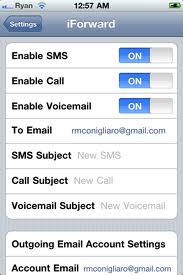
iForward is a great Cydia jailbreak tweak which will redirect your SMS messages to your email. There are different reasons you would want to do something like this. Perhaps it is your privacy you want to protect? If so, iForward could be an ideal solution for your needs. You can fetch this jailbreak tweak from Cydia app store. Of course, before you can get it and use it, you need to jailbreak your device with RedSn0w, Sn0wbreeze or some other jailbreak tool for iOS devices. This app was developed and launched by Ryan Conigliaro, who made it compatible with both iOS 4.x and iOS 5. Any configuration setting you need to adjust, can be done inside the standard iOS settings app. Afterwards, all new SMS will be efficiently delivered to your email inbox. Nice, isn’t it?
How to protect your SMS messages privacy

These days privacy protection becomes more and more important as our work and private life gets ever more connected and online. If you receive a text message everyone in your vicinity will know it instantly and this tends to cause unwanted curiosity. Luckily time after time jailbreak community finds out ways to help iPhone users in various ways.
iPhone jailbreak tweak of the day: BounceLock

Would you like to have an interesting bounce screen lock on your new iPhone 4S? If the answer is yes you just might check out this new jailbreak tweak called BounceLock. BounceLock is made by Zabi Rauf and it’s a visual tweak which introduces different levels of bounce effects on your devices unlock slide. This effect is really subtle and not obtrusive, and is meant primarily for those iPhone users which enjoy to customize the visual appearance of their iPhone. You can see the video bellow where this tweak is shown in action.
Jailbreak tweaks for iPhone efficiency: DoubleAt

Here is a new jailbreak tweak for your iPhone, iPad or iPod Touch. This one is a really simple tweak, yet one that can help you in some situations. This tweak comes handy when you need to write down your email address in a text message email or some IM app. When you need to write it down instead of wasting precious time, just tap the @ sign on the keyboard two times and your email will appear in your text. Simple as that, but we think it is certainly useful for people who use their iPhone as their primary communication tool. To get this tool, you’ll need first to jailbreak your iOS device with Redsn0w, PwnageTools, JailbreakMe 3.0 or some other jailbreak which is available for your iPhone, iPad or iPod Touch. You can get Double At in Cydia App Store and it comes as a free download. Enjoy and do let us know if you think it is indeed a useful tool for you.
Jailbreak tweak: UploadEnabler for Mobile Safari
Here is another fabulous jailbreak tweak this time comng from less known app developers H. Samara and Bassen N. This tweak meddles with your Safari web browser and enables you to upload any kind of file with your iPhone or iPad browser. Uploading is for some reason by default disabled within Apple iOS which can be quite cumbersome if you need to download or upload some important file. Luckily if you jailbreak your iPhone with RedSn0w, PwnageTool or Sn0wbreeze, you can use UploadEnabler to help you uploading files to the web. It works for iPhone’s on iOS 4.2.1 and higher.
Cydia tweaks: CallBar notification system
Here is another tweak which was created thanks to Ryan Petrich’s awesome Tweak Week challenge. CallBack is a new tweak which improves the idea of iOS notifications for calls and other notifications. As many of you are already aware, standard iOS notification system was for a long time one of the weakest parts of iOS, and for long time such way for notifications lagged considerably behind better solutions on Android and WebOS devices. CallBar introduces what iOS 5 is preparing for in this area, a simple and a nonintrusive mean of receiving calls.
Launch apps quickly with Super Slider Cydia tweak
Best Cydia tweaks will help iPhone users to use their iPhones or iPads faster and more efficiently than before. SuperSlider is a tweak that does the same thing. Apple’s iPhone and iPad are touch screen devices, that is one of the best features they have, but because of this it is necessary to have screen look on whenever the device isn’t actively used. But after some time it becomes a boring and time wasting task to unlock the screen everytime you need just to check out for new notifications on your device or status of some app.
Jailbreak tweak: delete spam from your Mail apllication
Delete Mail i s a new jailbreak tweak which helps you to manage your mail inbox much easier. While iOS is certainly the best mobile OS out there it has some small drawbacks, that can constantly bug you and spoil otherwise great iPhone user experience. One of such small problems is the inability to delete multiple junk emails at once. Instead of choosing to delete many of them instantly, you are forced to select every individual email before you can delete it.
Cydia tweaks for jailbroken iPhones: FolderEnhancer
iPhone jailbreaking is one of those things which in the beginning seem risky complicated and not very useful. But once you break this barrier of ignorance and insecurity and you jump on the ride, you will be more than happy for your decision. Jailbreak will open you a new gateway to plenty of interesting useful and cool tweaks which can greatly improve the usability of your iPhone. Here is another tweak for jailbroken iPhones.
The unlockanyiphone blog is dedicated to bring all unlocking iPhone (3GS, 3G, 4) and jailbreak iphone news to one place so every smarthphone user can easy unblock or unlock an iPhone. Download custom firmware versions, unlock/jailbreak tools and guides. Bring Cydia easy to your unlocked iPhone and read about iPhone 4/3GS/3G, iPod/iPad unlock techniques hack's and tricks. Unlocking iPhone has never been easier, Follow us and free your iPhone forever. Apple has to release many new products and we will cover them all.
Follow Us!



Recent Posts
Categories
Tags
Archives
Related Sources
- iPhone Dev Team