
iPhone and iPad 3D technology: a dream come true?
A group of French researchers has made a breaktrough in iPhone and iPad 3D technology. They have demonstrated 3D visual effects on iPhone 4 and iPad without need for special glasses. It seems that the technology works by making use of iPhone’s and iPads front camera to track users moves which enables the software to provide the 3D effect which looks similar to what is already available in Nintendo 3DS gaming console.
Here is a Youtube video with the demonstration of this technology.
Jailbreak tweaks: how to change your iPhone’s default browser
Would you like to try another iPhone browser instead of your Mobile Safari but you are tired of manually firing up your preferred browser for every new link? Here is a way to use your favorite browser as a default option on your iOS. To make this work you will fist have to have a jailbroken iPhone. If you for some reason didn’t jailbreak yet here is a good reason to do it. You can easily jailbreak your iPhone if you follow our instructions for jailbreaking with RedSn0w, GreenPosi0n or Pwnagetool. For more informations feel free to check our blogs archive on how to do it safely.
New IMEI based unlock for iPhone 4 and iPhone 3GS?
Apparently something new is going on in the iPhone world. We are hearing from many different sources that some new kind of unlock is now available to iPhone users. It is supposedly a remote based unlock which works through your IMEI ( International Mobile Equipment Identity). IMEI is a number which is unique for your handset and is used by your network carrier to identify your iPhone as a valid device. It can also be used to blacklist the device if it gets stolen.
So far most of these reports have not been confirmed as safe. As you all know there are many fake websites selling ineffective and false unlock solutions and services.
Add images to your contacts with Cyntact jailbreak tweak for iPhones
Customizing all things possible has always been one of the best things when it comes to iPhone. No other smartphone was prone to so many tweaks and changes. So in line with this here is another great tweak: Cyntact. Cyntact is basically a small tweak made by famous developer Jay Freeman who is better known as the man behind Cydia. The sole feature of the app is to add photos of people in your iPhone contact list.
Cydia apps: InfiniDock for iPhone upgraded to support iOS 4.3.1
Would you like to have as many icons on your iPhones dock as you want? Well there is a way. You can do just that with the Infinidock app from Cydia. And the app has just been upgraded to be compatible with the 4.3.1 firmware on iPhone and iPad. Basically Infinidock will enable you to customize the usual iPhone dock according to your needs. When you install this tweak you will be able to scroll lef and right on your dock to acces your apps. Please note that no icons will actually be added to your springboard.
How to enable multitasking gestures on iPhone
If you want to add some nice new features like enabling multitasking gestures but don’t want to modify your iPhone OS you can do it now with a nice little Cydia tweak. This tweak will work on your jailbroken iPhone running iOS version 4.3.1.
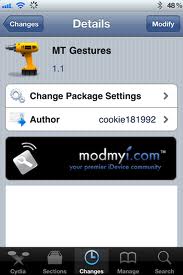

To get this tweak jailbreak your iPhone if you havent already and open Cydia. In Cydia search for MtGestures app. This app can be found in ModMyi repository. If you dont know how to add repositories into Cydia you can see the instructions here:
When you install the app tap on Winterboard app and select iPhone3,1_4.3.1_Gestures.
You are done! Reboot your iPhone and enable Multitasking Gestures by going to Settings > General Tab
Offically autobiography of Steve Jobs next year?
Sometimes it is quite complicated and boring if you want to explain to someone who is not an Apple fan why do people follow Apple with such enthusiasm. Perhaps one of the easiest way to explain this is to show people how wonderfully engineered and designed Apple devices really are. But if you try this more often than not people will not listen, and they will claim how good their other deceives like Android phones and OS like Windows are. Then you’ll probably get into some kind of verbal conflict which is not the best way to promote Apple brand. Perhaps you can enlighten people who are ignorants on Apple with a more subtle approach. How about if you offer them to listen to Steve Jobs life philosophy like in this Youtube video:
RedSn0w jailbreak for iPhone updated: version 0.9.6 RC12 available now!

Just few days ago we have wrote on our blog that the iPhone Dev Team has released an update to ther RedSn0w jailbreak tool, the version RedSn0w 2.9.6 RC9 , followed quickly by version Redsn0w 0.9.6 RC11 which added an animation option for the boot logo, courtesy of Chronic Dev Team. Dev Team is obviously seariously commmited to providing best and most current options to their software jailbreak and therefore has again upgrade their RedSn0w. You can now download the RedSn0w version 0.9.6 RC12. This upgrade is meant to fix some minor boot animation bugs.
How to get emoji for your iPhone
What is emoji? Emoji is term borrowed from Japan designating emoticon like icons in SMS messages which is very popular and widespread in Japan. In Japan, almost every possible wireless device has emoji, and its we have to say that emoji signs look much better than our simple emoticons! You can see for yourself in the image bellow how do they look like.
Tonido: stream files from your computer to your iPhone
Tonido is an app which will allow you to enjoy your media and other kind of files from your computer directly on your iPhone. It is free and it basically works as an app which connects to the computer with installed server app which can also be downloaded from the app developers website. Tonido will enable you to control your computer, listen to the music and watch videos stored on your computer. You can also access your stored photos and even documents in some formats. Basically you will be able to access and use almost any kind of file stored on your computers hard disk.
Follow Us!


Recent Posts
Categories
Tags
Archives
Related Sources
- iPhone Dev Team