
iPhone tip: how to save images to your iPhone
If you are like most of us and use your iPhone to surf the Internet, you will sooner or later wish to save some awesome picture to your iPhone. Perhaps you would like to explore it better when offline or maybe you plan to use this image as a wallpaper on your iPhone? Of course you know how to do it on your computer, but how could the same thing be done on your iPhone?
Most newbie’s think that you can’t save files to your iOS device (iPhone, iPo Touch or iPad) but this is correct. You can download variety of files from the Internet to your iPhone and this includes images too.
iPhone jailbreak removal
If you for any reason decide you don’t need the jailbreak any ore on your iPhone here is how you can do it. This will also work the same way on your iPod Touch and iPad.
Some users who jailbreak their iPhone proceed with installing massive amounts of apps and tweaks which in the end makes their device lagging slow and somewhat unstable. Or they just decide they have to take their iPhone to the Genius bar for some kind of repair.
So what should they do?
New Cydia tweak: Masks
Recently we have discovered a new and funny Cydia based tweak for your jailbroken iPhone. The tweak is called Masks. It was developed by Limneos. Thie tweak will change all your icons in predetermined shapes. You will still be able to clearly distinguish any icon but it will change the format of it.
This tweak comes with some interesting wallpapers and lockscreens. You will be bale to chose from more than 40 different masks. Masks come in different shapes, some of them look like Apple logo, interesting geometric shapes, snowboarders etc.
iPhone file management: iPhone explorer
iPhone explorer is a free application for your Windows PC or Mac computer which will help you to find view and manipulate files on your iPhone. It will work for both iPhones with and without jailbreak, but with on a iPhone without a jailbreak you wont be able to work with so called root files. Root files are files for which you have to have administrative rights (authorisation) in order to view and do anything else with them (cut, copy, paste etc.).
How to backup game data on jailbroken iPhone
There are many great games available to all you iPhone gamers out there. Almost all of them will have different levels you can get scores, earn new points and you wouldn’t certainly like to lose all this data when you restore your iPhone.
If you have do a jailbreak on your iPhone its very important to always back up your data. This is important for everybody in fact, no matter if you have a jailbroken iPhone or a freshly updated iPhone. Backup your data now so you wont have to worry later.
How To Zoom On The iPhone
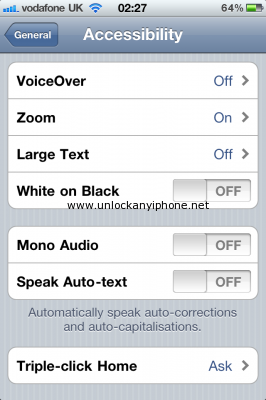
You know what most people like about the iPhone?
It is the clean and great looking UI that neatly stacks everything, smoothly glides over things and does things the easiest possible way.
Well, most of the times. But if you are amongst those people who think that the icons are too darn small to read, have no worries. The iOS has pretty good accessibility features built right in to it and one of them is the Zoom feature that can be activated and then used with multi touch gestures.
Running a marathon with iPhones and iPad
Computer geeks are not really sport oriented but this is not necessary true for all geeks. Could you imagine running a marathon equipped with iPhones, iPads, Android smartphones and tweeting while running? Well here is a example of somebody doing just that.
Joseph Tame, a runner and a geek from Hertfordshire, UK has equiped himself with no less than fpur iPhones, one iPad and two Android smartphones.
His intention is to capture live video, weather conditions for the runners, stream of his GPS locations and even heart rate during the complete race. His purpose for this marathon is to promote a charity foundation which helps children with cancer in Japan. He has streamed the live video stream of his run on his website tm2011.com
iPhone custom boot logo

Did you ever want to change your boot logo for your jailbroken iPhone on firmware 4.2.1?
Here is how you can achieve this with the new version of Greenpois0n jailbreak.
First method
First you will have to jailbreak your iPhonewith Greenpois0n RC5 and install Cydia
Tap Cydia and in the search box search for Apple Boot logo. You can find it in Mod Myi repo
Download the software package and choose to install it on your iPhone. You will need to reboot to finish the process.
Tap Settings on your springboard and now you can change the boot logo according to your preferences. You need to reboot for the change to take place.
iPad as a skype phone

Skype is a fantastic VOIP software well known in desktop computing world. It works on Windows and Mac OS. There is also Skype version for iPhones available in the iTunes app store. We can use this version of Skype for turning our iPad into a telephone. In fact you are limited only with your imagination what you can do with your iPad. So lets see necessary steps for turning your iPad into a funny looking telephone. You do not need to jailbreak your iPad to get this app.
Steps for installing Skype on iPad
Tip: Old iPod instead of Apple TV – how to stream video on standard definition TVs
It’s great to own an apple TV since you can easily stream your favorite content toward your HDMI equipped High Definition (HD) TV. But what happens if your TV belongs to the old family - TVs with composite RCA video & audio plugs? Is it possible to create something simple with some old stuff that we already have?


Of course it is  AND I am not talking here about expensive equipment and components for HDMI converters which are to expensive
  for this purpose you will need an iphone or even better an OLD ipod.
Follow Us!


Recent Posts
Categories
Tags
Archives
Related Sources
- iPhone Dev Team