
How to enable multitasking gestures on iPhone
If you want to add some nice new features like enabling multitasking gestures but don’t want to modify your iPhone OS you can do it now with a nice little Cydia tweak. This tweak will work on your jailbroken iPhone running iOS version 4.3.1.
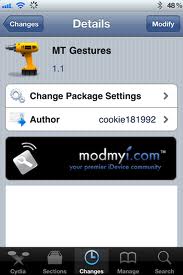

To get this tweak jailbreak your iPhone if you havent already and open Cydia. In Cydia search for MtGestures app. This app can be found in ModMyi repository. If you dont know how to add repositories into Cydia you can see the instructions here:
When you install the app tap on Winterboard app and select iPhone3,1_4.3.1_Gestures.
You are done! Reboot your iPhone and enable Multitasking Gestures by going to Settings > General Tab
How to get emoji for your iPhone
What is emoji? Emoji is term borrowed from Japan designating emoticon like icons in SMS messages which is very popular and widespread in Japan. In Japan, almost every possible wireless device has emoji, and its we have to say that emoji signs look much better than our simple emoticons! You can see for yourself in the image bellow how do they look like.
Tonido: stream files from your computer to your iPhone
Tonido is an app which will allow you to enjoy your media and other kind of files from your computer directly on your iPhone. It is free and it basically works as an app which connects to the computer with installed server app which can also be downloaded from the app developers website. Tonido will enable you to control your computer, listen to the music and watch videos stored on your computer. You can also access your stored photos and even documents in some formats. Basically you will be able to access and use almost any kind of file stored on your computers hard disk.
iPhone tips for iOS newbies: how to delete browsing history
Deleting browser history is a normal procedure for anyone who is serious about personal privacy. No matter what you do and search for online you should be the only one with access to your browsing history.
This is one of the reasons you will want to clear your browser history every now and then. Here is how you should do it if you never did it previously. Start your Safari browser and tap on “History” which you will see on the bottom of the iPhone screen, the History icon looks like a book. Whn you open History tap on the option “Clear” and this will erase data on all previously visited websites.
Apple updates iBook app: easier file transfer and support for epub files
One of the best ways to use your iOS device whether you have iPhone, iPod or iPad is to use it as an ebook reader. While there are many specially designed ebook readers available on the market like the Amazon Kindle, Barnes & Noble Nook and others, iPad is a far more versatile device as it is booth an ebook reader and a computing platform like your desktop computer.
iPhone tips and tricks: how to save images from your email
Since the iPhone revolution started few years ago, it had spread with unbelievable speed all around the globe. And it is still spreading and every day increased number of people get to enjoy in Apple’s wonder technology. But this also brings a variety of problems fro newcomers in the iOS world. What was easy on older phones or computers often gets confusing, at least until you get used to the way things work in the iPhone world.
iPhone Cydia apps: iKeyGuard - control the usage of your iPhone
A new interesting app has come under our radar recently. As it is always interesting to increase your iPhone safety we will introduce you to this new Cydia app.
iKeyGuard is basically a key logger, an software application which will record all keyboard input into your device. it is well known in the desktop computing world but mainly for different reasons. For an iPhone or iPad the goal of a keyboard logger is different. If you want to control how your kids or wife use the device you should install this app and it will gather any input into the iPhone or iPad virtual keyboard in any app available on the device. This includes typing email, texting, writing or anything else. If you type an email address, it will be stored, if you send and text message to someone the whole message will be stored.
Jailbreak iOS tips and tricks: disable Spotlight search on your iPhone or iPad
If for some reason you don’t use Spotlight search too often and if you would like to learn how to disable this feature please read on. If you are a proud owner of a iPhone, iPod or iPad which is jailbroken you can in a simple and easy way disable Spotlight from wasting your time and patience. When you jailbreak your iPhone you will have access to the Cydia app store where you can find and install a free app named NoSpot.
iPhone tips & tricks: Disable Ping to increase battery life
If you have recently upgraded to iOS 4.3 on your iPhone, iPad or iPod you have probably been among many users which have complained about the significant battery life time decrease. It is not clear whether Apple engineers have actually tried to solve this problem in the recent upgrade to iOS 4.3.1 but since many jailbreakers are not yet willing to update this problems still bothers many users.
Guide for connecting your iPhone to your home or office Wi-Fi network
If you are new to the iPhone world and you have at home a wireless router and dnon’t know how to use it to have Wi-Fi internet on your iPhone, here is a short instruction.
Why should you consider this? Well beside being a cheaper option, your home or office Wi-Fi connection will provide you with much faster data connection. Why waste your 3G data plan if you can download music video or other content for free? If you are more experienced this instruction wont be of much use but for many people iPhone is somethng new and exotic, great to have but not many people know how to navigate around such issues like utilizing Wi-Fi internet on their iOS device. Note: this process is almost same on iPad.
Follow Us!


Recent Posts
Categories
Tags
Archives
Related Sources
- iPhone Dev Team